Connection OK but no access or internet- using router as VPN server
Posted: Thu Jan 03, 2019 10:54 pm
I’m a complete novice in terms of VPN, so please bear with me...
I recently upgraded the router for our small business to the TP-Link Archer C2300, and chose that router partially because it can (supposedly) act as a VPN server, and specifically supports OpenVPN.
My goal:
When in the office my boss can use QuickBooks on his laptop, connected through the network to the main company file on the bookkeeping PC. He wants to be able to do that from home as well. Fairly straightforward stuff...nothing too fancy.
The Problem:
The client connects to the network and it shows up as a 2nd network in Network and Sharing Center...but I can’t see any of the computers that are on the network.
(I’m assuming the VPN network should show up in the left panel any normal window, below Favorites, Libraries, Computer, and the physical network, correct? If not, where?)
I’m using OpenVPN version 2.4 (The router’s VPN setup instructions direct you to get the client software from https://openvpn.net/community-downloads/)
and currently I’m testing with a client PC running Win7 (Pro), which is connected to the internet via a home wifi router and cable modem.
Server-side router is connected directly to cable modem and our service has a static IP.
Note: all physical clients on the network connect to the router via a smart switch (Netgear Prosafe GS116E), but that shouldn’t affect anything should it?
The certificate and subsequently the config file, are automatically generated by the router.
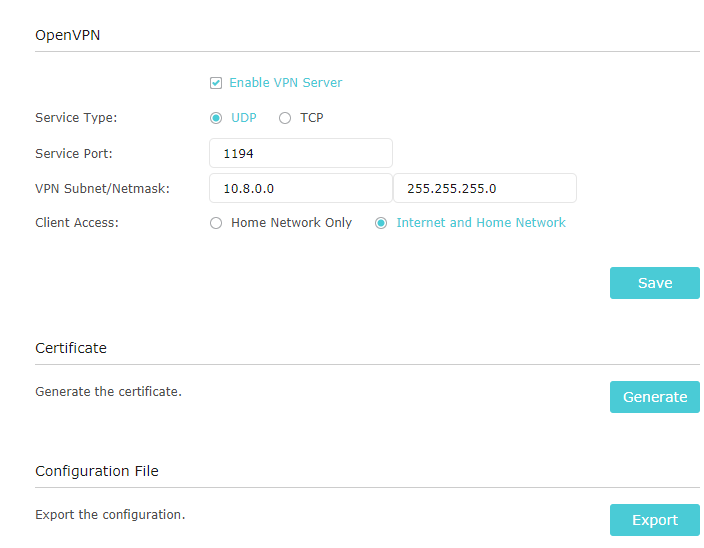
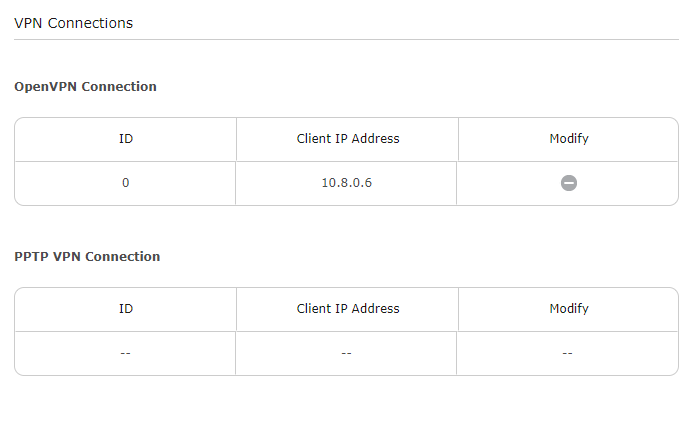
I don’t know where to get the server config file or the server log...router’s log file options include one titled “L2TP and PPTP” but no OpenVPN or similar. I'm including screenshots of the router gui below. Happy to provide anything else if I can find it.
client
dev tun
proto udp
float
nobind
cipher AES-128-CBC
comp-lzo adaptive
resolv-retry infinite
persist-key
persist-tun
remote xxx.our.static.ip 1194
<ca>
blah blah blah
</ca>
<cert>
blah blah blah
</cert>
<key>
blah blah blah
</key>
Thu Jan 03 15:51:36 2019 OpenVPN 2.4.6 x86_64-w64-mingw32 [SSL (OpenSSL)] [LZO] [LZ4] [PKCS11] [AEAD] built on Apr 26 2018
Thu Jan 03 15:51:36 2019 Windows version 6.1 (Windows 7) 64bit
Thu Jan 03 15:51:36 2019 library versions: OpenSSL 1.1.0h 27 Mar 2018, LZO 2.10
Thu Jan 03 15:51:36 2019 WARNING: No server certificate verification method has been enabled. See http://openvpn.net/howto.html#mitm for more info.
Thu Jan 03 15:51:36 2019 TCP/UDP: Preserving recently used remote address: [AF_INET]xxx.our.static.ip:1194
Thu Jan 03 15:51:36 2019 UDP link local: (not bound)
Thu Jan 03 15:51:36 2019 UDP link remote: [AF_INET]xxx.our.static.ip:1194
Thu Jan 03 15:51:37 2019 [server] Peer Connection Initiated with [AF_INET]xxx.our.static.ip:1194
Thu Jan 03 15:51:38 2019 open_tun
Thu Jan 03 15:51:38 2019 TAP-WIN32 device [Local Area Connection 7] opened: \\.\Global\{060D6E23-22F9-4CB6-B2E5-A301BB962EF2}.tap
Thu Jan 03 15:51:38 2019 Notified TAP-Windows driver to set a DHCP IP/netmask of 10.8.0.6/255.255.255.252 on interface {060D6E23-22F9-4CB6-B2E5-A301BB962EF2} [DHCP-serv: 10.8.0.5, lease-time: 31536000]
Thu Jan 03 15:51:38 2019 Successful ARP Flush on interface [29] {060D6E23-22F9-4CB6-B2E5-A301BB962EF2}
Thu Jan 03 15:51:38 2019 do_ifconfig, tt->did_ifconfig_ipv6_setup=0
Thu Jan 03 15:51:43 2019 WARNING: this configuration may cache passwords in memory -- use the auth-nocache option to prevent this
Thu Jan 03 15:51:43 2019 Initialization Sequence Completed
TP-Link’s instructions are brief and somewhat vague, and imply it's practically plug-n-play:
https://www.tp-link.com/us/faq-1544.html
It has one instruction that I’m a little iffy about:
Any help or suggestions you can provide would be much appreciated...not only by me, but also by all my colleagues who want to encourage the boss to work from home as much as possible...
I recently upgraded the router for our small business to the TP-Link Archer C2300, and chose that router partially because it can (supposedly) act as a VPN server, and specifically supports OpenVPN.
My goal:
When in the office my boss can use QuickBooks on his laptop, connected through the network to the main company file on the bookkeeping PC. He wants to be able to do that from home as well. Fairly straightforward stuff...nothing too fancy.
The Problem:
The client connects to the network and it shows up as a 2nd network in Network and Sharing Center...but I can’t see any of the computers that are on the network.
(I’m assuming the VPN network should show up in the left panel any normal window, below Favorites, Libraries, Computer, and the physical network, correct? If not, where?)
I’m using OpenVPN version 2.4 (The router’s VPN setup instructions direct you to get the client software from https://openvpn.net/community-downloads/)
and currently I’m testing with a client PC running Win7 (Pro), which is connected to the internet via a home wifi router and cable modem.
Server-side router is connected directly to cable modem and our service has a static IP.
Note: all physical clients on the network connect to the router via a smart switch (Netgear Prosafe GS116E), but that shouldn’t affect anything should it?
The certificate and subsequently the config file, are automatically generated by the router.
I don’t know where to get the server config file or the server log...router’s log file options include one titled “L2TP and PPTP” but no OpenVPN or similar. I'm including screenshots of the router gui below. Happy to provide anything else if I can find it.
config.ovpn
client
dev tun
proto udp
float
nobind
cipher AES-128-CBC
comp-lzo adaptive
resolv-retry infinite
persist-key
persist-tun
remote xxx.our.static.ip 1194
<ca>
blah blah blah
</ca>
<cert>
blah blah blah
</cert>
<key>
blah blah blah
</key>
client connection log
Thu Jan 03 15:51:36 2019 OpenVPN 2.4.6 x86_64-w64-mingw32 [SSL (OpenSSL)] [LZO] [LZ4] [PKCS11] [AEAD] built on Apr 26 2018
Thu Jan 03 15:51:36 2019 Windows version 6.1 (Windows 7) 64bit
Thu Jan 03 15:51:36 2019 library versions: OpenSSL 1.1.0h 27 Mar 2018, LZO 2.10
Thu Jan 03 15:51:36 2019 WARNING: No server certificate verification method has been enabled. See http://openvpn.net/howto.html#mitm for more info.
Thu Jan 03 15:51:36 2019 TCP/UDP: Preserving recently used remote address: [AF_INET]xxx.our.static.ip:1194
Thu Jan 03 15:51:36 2019 UDP link local: (not bound)
Thu Jan 03 15:51:36 2019 UDP link remote: [AF_INET]xxx.our.static.ip:1194
Thu Jan 03 15:51:37 2019 [server] Peer Connection Initiated with [AF_INET]xxx.our.static.ip:1194
Thu Jan 03 15:51:38 2019 open_tun
Thu Jan 03 15:51:38 2019 TAP-WIN32 device [Local Area Connection 7] opened: \\.\Global\{060D6E23-22F9-4CB6-B2E5-A301BB962EF2}.tap
Thu Jan 03 15:51:38 2019 Notified TAP-Windows driver to set a DHCP IP/netmask of 10.8.0.6/255.255.255.252 on interface {060D6E23-22F9-4CB6-B2E5-A301BB962EF2} [DHCP-serv: 10.8.0.5, lease-time: 31536000]
Thu Jan 03 15:51:38 2019 Successful ARP Flush on interface [29] {060D6E23-22F9-4CB6-B2E5-A301BB962EF2}
Thu Jan 03 15:51:38 2019 do_ifconfig, tt->did_ifconfig_ipv6_setup=0
Thu Jan 03 15:51:43 2019 WARNING: this configuration may cache passwords in memory -- use the auth-nocache option to prevent this
Thu Jan 03 15:51:43 2019 Initialization Sequence Completed
TP-Link’s instructions are brief and somewhat vague, and imply it's practically plug-n-play:
https://www.tp-link.com/us/faq-1544.html
It has one instruction that I’m a little iffy about:
Because we have a static IP from our ISP, this recommendation is covered, correct?“Before you enable VPN Server, we recommend you configure Dynamic DNS Service (recommended) or assign a static IP address for router’s WAN port”
Any help or suggestions you can provide would be much appreciated...not only by me, but also by all my colleagues who want to encourage the boss to work from home as much as possible...