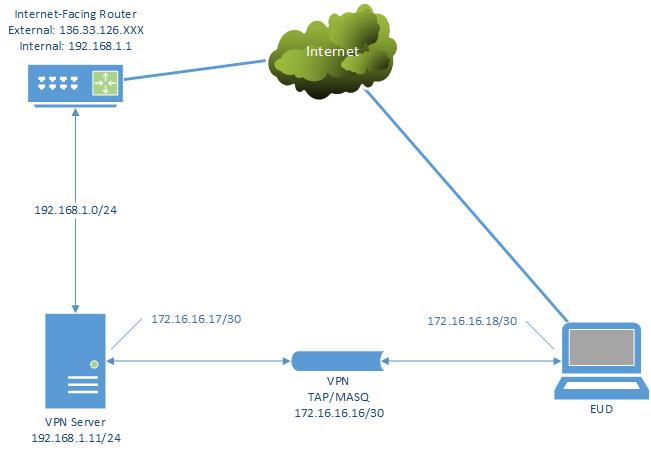
Need TAP, Can't Route @ Default GW
Posted: Sun Dec 16, 2018 1:35 am
ETA: And I realized I posted this in the wrong forum ... any way to move it to "Server Administration?" Sorry about that.
I feel like I might be close to figuring out a solution for myself here, but I'm stuck. In my previous question about whether I need to use tap or tun for my solution, I arrived (I thought) at the need to use tap. Well, I spent a little bit this evening getting that working and I was pretty happy when it seemed to work. Then, I moved my config over to my iPhone and discovered the dreaded EVENT: TAP_NOT_SUPPORTED OSI layer 2 tunnels are not currently supported error (which I am sure a lot of mobile phone users already saw coming as they read this.)
So, do over.
The reason I started to think I needed tap was I am unable to add a route to my router (Google Fiber) and I have no other options but to use the Google router. I guess there has to be a drawback to having gigabit Internet huh? I need Internet and without being able to route the "foreign" VPN network back to the VPN server there's no way to do that, or so I thought. So, the only way was tap where I was actually bridged to the local network. But, because of the whole "no layer 2 in iOS" thing, that failed miserably.
I started thinking there's got to be a way so my non-network engineer brain tells me: "I should be able to somehow NAT the VPN's subnet at the VPN server and make this work." Right?
Well I found this post from 2011 which seems to describe what I need to do in method 4, masquerading: Accessing LAN resources when OpenVPN is not LAN's GW
I blindly charged in and started cutting and pasting (I can always snap back to an older version if I eff it up) and I got as far as "And of course create a ccd file with name like common name of client's certificate and write in it ". At that point I realized I had no business cutting and pasting a bunch of iptables statements without understanding the whole thing.
I did finally get these in which all of a sudden seemed to me like I could be opening a can of worms:
So I'm wondering first of all, is masquerading the solution for my problem? If so, is there maybe a "hello world" version of this somewhere?
I realize I'm probably in way over my head here but that's part of the fun, right?
I feel like I might be close to figuring out a solution for myself here, but I'm stuck. In my previous question about whether I need to use tap or tun for my solution, I arrived (I thought) at the need to use tap. Well, I spent a little bit this evening getting that working and I was pretty happy when it seemed to work. Then, I moved my config over to my iPhone and discovered the dreaded EVENT: TAP_NOT_SUPPORTED OSI layer 2 tunnels are not currently supported error (which I am sure a lot of mobile phone users already saw coming as they read this.)
So, do over.
The reason I started to think I needed tap was I am unable to add a route to my router (Google Fiber) and I have no other options but to use the Google router. I guess there has to be a drawback to having gigabit Internet huh? I need Internet and without being able to route the "foreign" VPN network back to the VPN server there's no way to do that, or so I thought. So, the only way was tap where I was actually bridged to the local network. But, because of the whole "no layer 2 in iOS" thing, that failed miserably.
I started thinking there's got to be a way so my non-network engineer brain tells me: "I should be able to somehow NAT the VPN's subnet at the VPN server and make this work." Right?
Well I found this post from 2011 which seems to describe what I need to do in method 4, masquerading: Accessing LAN resources when OpenVPN is not LAN's GW
I blindly charged in and started cutting and pasting (I can always snap back to an older version if I eff it up) and I got as far as "And of course create a ccd file with name like common name of client's certificate and write in it ". At that point I realized I had no business cutting and pasting a bunch of iptables statements without understanding the whole thing.
I did finally get these in which all of a sudden seemed to me like I could be opening a can of worms:
Code: Select all
Chain INPUT (policy ACCEPT)
target     prot opt source               destination
ACCEPT     all  --  anywhere             anywhere

Chain FORWARD (policy ACCEPT)
target     prot opt source               destination
ACCEPT     all  --  anywhere             anywhere
ACCEPT     all  --  anywhere             anywhere

Chain OUTPUT (policy ACCEPT)
target prot opt source destinationI realize I'm probably in way over my head here but that's part of the fun, right?