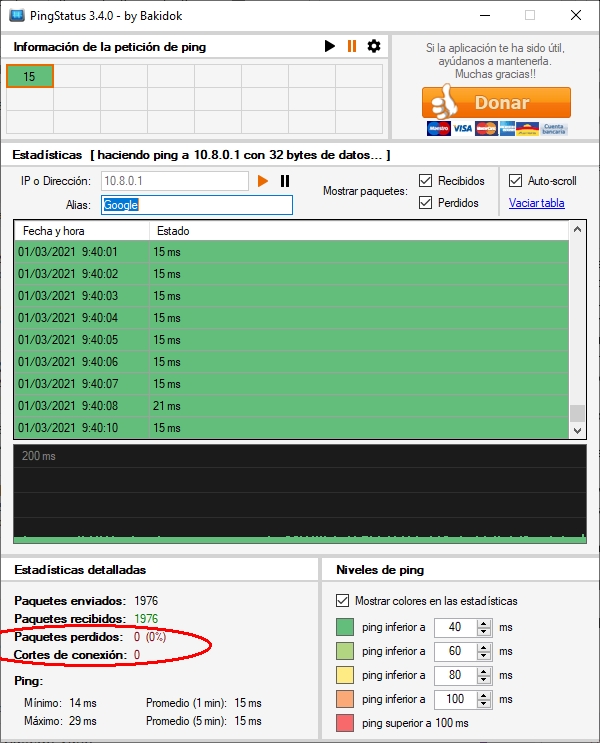
Sorry for the delay. I can't test the connection every day.
I have made some progress.
The first thing I did was go with the computer that has the stable client and physically connect it to the router where the unstable client's computer connects. The stable client on the unstable client connection does not produce the problem. Therefore, the connection is Ok.
While there, take the opportunity to perform windows updates on the stable client's computer.
Now this client no longer causes connection drops. Not having done it before has been a hazing on my part. :oops:
I have also updated the Windows of the computers to the other two clients and one of them has stopped producing cuts, but the other has not. In the computer that continues to cause connection cuts I have performed a virus scan, and it appears clean.
TinCanTech wrote
Please upgrade to Openvpn version 2.5
danielgaspar wrote
I did another test. I made a clean install of the OVPN server on another Windows 10 computer. The result is the same. So the server hardware is ok.
I already tried it when I did this test install (TCP and UDP).
TinCanTech wrote
I posted a mail to the mailing list on your behalf, see if it helps.
Thank you!
TinCanTech wrote
You can also try # (Or lower)
I don't think I got it right. Should I try it, no number? Only the symbol #
So now there is only one client left that produces connection cuts. Everything indicates that it is a Windows-related problem on client computers.
I am going to try the other configurations that you have recommended.