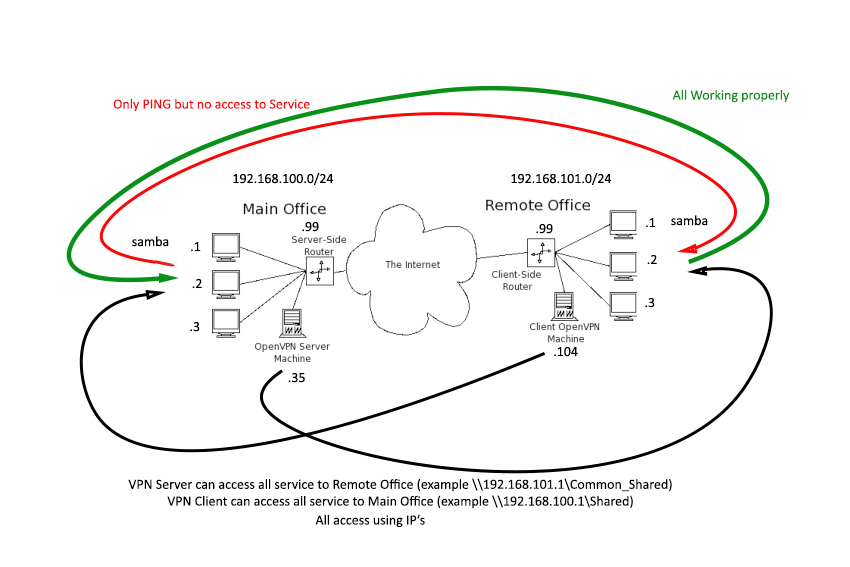
jayem_heh I miss one test and find out that All are working properly now except this one. OpenvpnServer Lan Client cannot access OpenVpnClient Lan Client. That is the only thing missing now. This is my last IP tables. both side server and client iptables rule only iptables -t nat -A POSTROUTING -o XXXX -j MASQUERADE any idea?
300000 you should test this rule first . iptables -t nat -A POSTROUTING -o eth0 -j MASQUERADE let the whole range ip going through to see if it work or not , after that you will apply your rule with ip range and you will find out . iptables rule create trouble and it only work with proper rule apply. nothing with openvpn.
jayem_heh @300000 I did this, only this I put. Server iptables -t nat -A POSTROUTING -o enp2s0 -j MASQUERADE Client iptables -t nat -A POSTROUTING -o enp3s0 -j MASQUERADE The result is this.
300000 only samba not working this is something to block it , all other is working now so you can check all iptable rule first to see if you block something and chech samba when it block outside to connect .this is all network trouble not openvpn at all iptables -t nat -L
jayem_heh Not only samba but whole client lan. I cannot hit any services on client lan from Server Lan. [root@localhost openvpn]# iptables -t nat -L Chain PREROUTING (policy ACCEPT) target prot opt source destination Chain INPUT (policy ACCEPT) target prot opt source destination Chain OUTPUT (policy ACCEPT) target prot opt source destination Chain POSTROUTING (policy ACCEPT) target prot opt source destination MASQUERADE all -- anywhere anywhere [root@localhost ~]# iptables -t nat -L Chain PREROUTING (policy ACCEPT) target prot opt source destination Chain INPUT (policy ACCEPT) target prot opt source destination Chain OUTPUT (policy ACCEPT) target prot opt source destination Chain POSTROUTING (policy ACCEPT) target prot opt source destination MASQUERADE all -- anywhere anywhere
jayem_heh On router side no blocking, I disabled SPI while troubleshooting this last issue but no luck.
300000 so let ssh to your router and try ping all ps to see from router can it connect to all pc or block ? because from openvpn client all service is ok nothing wrong but only client behide router have some trouble that is why you need to check from router .
jayem_heh I can ping everything from Client Router Client Router Remote Office Samba Remote Office Pinging 192.168.101.1 with 64 bytes of data: Reply from 192.168.101.1: bytes=64 time=2 TTL=128 seq=1 Reply from 192.168.101.1: bytes=64 time=4 TTL=128 seq=2 Reply from 192.168.101.1: bytes=64 time=1 TTL=128 seq=3 Ping statistics for 192.168.101.1 Packets: Sent = 3, Received = 3, Lost = 0 (0% loss) Approximate round trip times in milliseconds: Minimum = 1, Maximum = 4, Average = 2 OpenVpn Client Pinging 192.168.101.104 with 64 bytes of data: Reply from 192.168.101.104: bytes=64 time=1 TTL=64 seq=1 Reply from 192.168.101.104: bytes=64 time=1 TTL=64 seq=2 Reply from 192.168.101.104: bytes=64 time=1 TTL=64 seq=3 Reply from 192.168.101.104: bytes=64 time=1 TTL=64 seq=4 Ping statistics for 192.168.101.104 Packets: Sent = 4, Received = 4, Lost = 0 (0% loss) Approximate round trip times in milliseconds: Minimum = 1, Maximum = 1, Average = 1 OpenVpn Server Pinging 192.168.100.35 with 64 bytes of data: Reply from 192.168.100.35: bytes=64 time=9 TTL=63 seq=1 Reply from 192.168.100.35: bytes=64 time=13 TTL=63 seq=2 Reply from 192.168.100.35: bytes=64 time=12 TTL=63 seq=3 Reply from 192.168.100.35: bytes=64 time=13 TTL=63 seq=4 Ping statistics for 192.168.100.35 Packets: Sent = 4, Received = 4, Lost = 0 (0% loss) Approximate round trip times in milliseconds: Minimum = 9, Maximum = 13, Average = 11 Samba Main Office Pinging 192.168.100.1 with 64 bytes of data: Reply from 192.168.100.1: bytes=64 time=9 TTL=126 seq=1 Reply from 192.168.100.1: bytes=64 time=12 TTL=126 seq=2 Reply from 192.168.100.1: bytes=64 time=13 TTL=126 seq=3 Reply from 192.168.100.1: bytes=64 time=13 TTL=126 seq=4 Ping statistics for 192.168.100.1 Packets: Sent = 4, Received = 4, Lost = 0 (0% loss) Approximate round trip times in milliseconds: Minimum = 9, Maximum = 13, Average = 11 Router Main Office Pinging 192.168.100.99 with 64 bytes of data: Reply from 192.168.100.99: bytes=64 time=13 TTL=62 seq=1 Reply from 192.168.100.99: bytes=64 time=12 TTL=62 seq=2 Reply from 192.168.100.99: bytes=64 time=12 TTL=62 seq=3 Reply from 192.168.100.99: bytes=64 time=12 TTL=62 seq=4 Ping statistics for 192.168.100.99 Packets: Sent = 4, Received = 4, Lost = 0 (0% loss) Approximate round trip times in milliseconds: Minimum = 12, Maximum = 13, Average = 12
300000 You need install wincap to tracking it where it go when you connect to samba. Nothing on openvpn at all . Only your network and iptables block it.