Hi, I hope you can help me. I have two week working in the solution but in can´t deal with an problem. I am trying to do an Site-to-Site OpenVPN connection between two router with the posibility to access from internet an comunicate with any pc in server lan or client lan. Share with you my configurations:
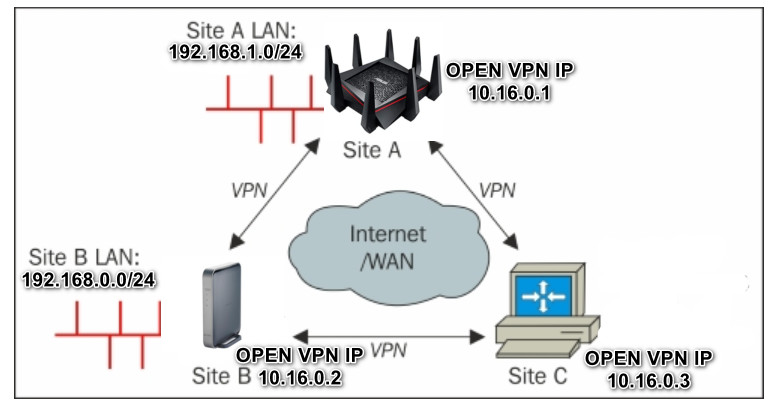
____________________________________________________________________________________________________
Main Router (at Work)
Model: Asus RT-AC5300
Firmware: Asuswrt Merlin 384.19
LAN Subnet: 192.168.1.0/24
LAN IP: 192.168.1.1
WAN IP: xxx.141.67.160
OpenVPN Subnet: 10.16.0.1/24
OpenVPN IP: 10.16.0.1
____________________________________________________________________________________________________
Client Router (Home)
Model: Buffalo WZR-D1800H
Firmware: DD-WRT v3.0-r44251 giga
LAN Subnet: 192.168.0.0/24
LAN IP: 192.168.0.1
WAN IP: yyy.140.129.178
OpenVPN IP: 10.16.0.2
____________________________________________________________________________________________________
Client3 (Remote PC), conected from anywere on Internet:
Client Router (Home)
Model: Lenovo
Firmware: WINDOWS 10
WAN IP: xxx.xxx.xxx.xxx
OpenVPN IP: 10.16.0.3
____________________________________________________________________________________________________
daemon ovpn-server2
topology subnet
server 10.16.0.0 255.255.255.0
proto udp
port 1195
dev tun22
txqueuelen 1000
ncp-ciphers AES-128-GCM:AES-256-GCM:AES-128-CBC:AES-256-CBC
cipher AES-256-CBC
auth SHA256
comp-lzo adaptive
keepalive 15 60
verb 3
push "route 192.168.1.0 255.255.255.0 vpn_gateway 500"
client-config-dir ccd
push "dhcp-option DOMAIN xfileshome"
push "dhcp-option DNS 192.168.1.93"
push "dhcp-option DNS 192.168.1.1"
tls-auth static.key 0
ca ca.crt
dh dh.pem
cert server.crt
key server.key
script-security 2
up 'ovpn-up 2 server'
down 'ovpn-down 2 server'
status-version 2
status status 5
# Custom Configuration
tls-server
status openvpn-status.log
route 192.168.0.0 255.255.255.0 10.16.0.2
client-config-dir /jffs/openvpn/ccd
topology subnet
push "topology subnet"
server 10.16.0.0 255.255.255.0 nopool
ifconfig-pool 10.16.0.100 10.16.0.200
ifconfig-pool-persist /jffs/openvpn/ipp.txt
persist-key
persist-tun
reneg-sec 3600
# New Config Added on 30/09/2020 10:29 am
tun-mtu 1500
mssfix 1400
ca /tmp/openvpncl/ca.crt
cert /tmp/openvpncl/client.crt
key /tmp/openvpncl/client.key
management 127.0.0.1 16
management-log-cache 100
verb 3
mute 3
syslog
writepid /var/run/openvpncl.pid
client
resolv-retry infinite
nobind
persist-key
persist-tun
script-security 2
dev tun1
proto udp4
cipher aes-256-cbc
auth sha256
remote xxx.141.67.160 1195
comp-lzo adaptive
tun-mtu 1500
mtu-disc yes
fast-io
tls-auth /tmp/openvpncl/ta.key 1
route-up /tmp/openvpncl/route-up.sh
route-pre-down /tmp/openvpncl/route-down.sh
client
dev tun
proto udp
resolv-retry infinite
nobind
float
ncp-ciphers AES-128-GCM:AES-256-GCM:AES-128-CBC:AES-256-CBC
cipher AES-256-CBC
auth SHA256
comp-lzo adaptive
keepalive 15 60
remote-cert-tls server
key-direction 1
verb 3
#New Configurations 30/09/2020 10:23 am
persist-key
persist-tun
auth-nocache
tun-mtu 1500
mssfix 1400
topology subnet
client
dev tun
proto udp
remote xxx.141.67.160 1195
resolv-retry infinite
nobind
float
ncp-ciphers AES-128-GCM:AES-256-GCM:AES-128-CBC:AES-256-CBC
cipher AES-256-CBC
auth SHA256
comp-lzo adaptive
keepalive 15 60
remote-cert-tls server
key-direction 1
verb 3
#Added on 30/09/2020 10:34 am
persist-key
persist-tun
auth-nocache
tun-mtu 1500
mssfix 1400
____________________________________________________________________________________________________
CCD Files Location and Content created in OpenVPN Server:
Client1, CCD File in Server Folder: /jffs/openvpn/ccd/nas1
nas1 content:
ifconfig-push 10.16.0.2 255.255.255.0
iroute 192.168.0.0 255.255.255.0
____________________________________________________________________________________________________
Client2, CCD File in Server Folder: /jffs/openvpn/ccd/rdmitre
rdmitre content:
ifconfig-push 10.16.0.3 255.255.255.0
push "route 192.168.0.0 255.255.255.0 10.16.0.2"
____________________________________________________________________________________________________
Server Routing Table
Kernel IP routing table
Destination Gateway Genmask Flags Metric Ref Use Iface
xxx.141.67.129 0.0.0.0 255.255.255.255 UH 0 0 0 eth0
xxx.141.67.128 0.0.0.0 255.255.255.192 U 0 0 0 eth0
10.16.0.0 0.0.0.0 255.255.255.0 U 0 0 0 tun22
192.168.1.0 0.0.0.0 255.255.255.0 U 0 0 0 br0
192.168.0.0 10.16.0.2 255.255.255.0 UG 0 0 0 tun22
10.8.1.0 0.0.0.0 255.255.255.0 U 0 0 0 tun21
127.0.0.0 0.0.0.0 255.0.0.0 U 0 0 0 lo
0.0.0.0 xxx.141.67.129 0.0.0.0 UG 0 0 0 eth0
Client Router Routing Table
Kernel IP routing table
Destination Gateway Genmask Flags Metric Ref Use Iface
0.0.0.0 xxx.140.129.129 0.0.0.0 UG 0 0 0 vlan2
10.16.0.0 0.0.0.0 255.255.255.0 U 0 0 0 tun0
127.0.0.0 0.0.0.0 255.0.0.0 U 0 0 0 lo
xxx.140.129.128 0.0.0.0 255.255.255.192 U 0 0 0 vlan2
192.168.0.0 0.0.0.0 255.255.255.0 U 0 0 0 br0
192.168.1.0 10.16.0.1 255.255.255.0 UG 500 0 0 tun0
____________________________________________________________________________________________________
Client 2, Computer Routing Table
IPv4 Tabla de enrutamiento
===========================================================================
Rutas activas:
Destino de red Máscara de red Puerta de enlace Interfaz Métrica
0.0.0.0 0.0.0.0 xxx.141.184.1 xxx.141.185.22 25
10.16.0.0 255.255.255.0 En vínculo 10.16.0.3 291
10.16.0.3 255.255.255.255 En vínculo 10.16.0.3 291
10.16.0.255 255.255.255.255 En vínculo 10.16.0.3 291
127.0.0.0 255.0.0.0 En vínculo 127.0.0.1 331
127.0.0.1 255.255.255.255 En vínculo 127.0.0.1 331
127.255.255.255 255.255.255.255 En vínculo 127.0.0.1 331
xxx.141.184.0 255.255.252.0 En vínculo xxx.141.185.22 281
xxx.141.185.22 255.255.255.255 En vínculo xxx.141.185.22 281
xxx.141.187.255 255.255.255.255 En vínculo xxx.141.185.22 281
192.168.0.0 255.255.255.0 10.16.0.2 10.16.0.3 291
192.168.1.0 255.255.255.0 10.16.0.1 10.16.0.3 535
224.0.0.0 240.0.0.0 En vínculo 127.0.0.1 331
224.0.0.0 240.0.0.0 En vínculo xxx.141.185.22 281
224.0.0.0 240.0.0.0 En vínculo 10.16.0.3 291
255.255.255.255 255.255.255.255 En vínculo 127.0.0.1 331
255.255.255.255 255.255.255.255 En vínculo xxx.141.185.22 281
255.255.255.255 255.255.255.255 En vínculo 10.16.0.3 291
===========================================================================
____________________________________________________________________________________________________
Traceroute From Client in Server Subnet to Client in Client1 Subnet:
pi@raspberrypi:~ $ traceroute 192.168.0.2
traceroute to 192.168.0.2 (192.168.0.2), 30 hops max, 60 byte packets
1 192.168.1.1 (192.168.1.1) 3.509 ms 3.555 ms 3.899 ms
2 10.16.0.2 (10.16.0.2) 27.110 ms 41.057 ms 41.135 ms
3 192.168.0.2 (192.168.0.2) 41.196 ms 41.259 ms 42.164 ms
____________________________________________________________________________________________________
Traceroute From Client in Client1 Subnet to Client in Server Subnet:
WDMyCloud:~# traceroute 192.168.1.5
traceroute to 192.168.1.5 (192.168.1.5), 30 hops max, 60 byte packets
1 DD-WRT (192.168.0.1) 0.637 ms 1.038 ms 0.959 ms
2 10.16.0.1 (10.16.0.1) 26.434 ms 26.934 ms 27.362 ms
3 192.168.1.5 (192.168.1.5) 32.398 ms 32.935 ms 33.469 ms
____________________________________________________________________________________________________
Traceroute From Client2 (remote client) to Client in Server Subnet:
C:\Users\user>tracert 192.168.1.5
Traza a la dirección xfileshome-NAS.xfileshome [192.168.1.5
sobre un máximo de 30 saltos:
1 18 ms 33 ms 24 ms 10.16.0.1
2 37 ms 23 ms 25 ms xfileshome-NAS.xfileshome [192.168.1.5
Traza completa.
____________________________________________________________________________________________________
Traceroute From Client2 (remote client) to Client in Client1 Subnet:
C:\Users\user>tracert 192.168.0.2
Traza a 192.168.0.2 sobre caminos de 30 saltos como máximo.
1 43 ms 24 ms 20 ms 10.16.0.1
2 * * * Tiempo de espera agotado para esta solicitud.
3 * * * Tiempo de espera agotado para esta solicitud.
4 * * * Tiempo de espera agotado para esta solicitud.
5 * * * Tiempo de espera agotado para esta solicitud.
____________________________________________________________________________________________________
Ping From Client2 (remote client) to Client in Client1 Subnet:
C:\Users\user>ping 192.168.0.2
Haciendo ping a 192.168.0.2 con 32 bytes de datos:
Tiempo de espera agotado para esta solicitud.
Tiempo de espera agotado para esta solicitud.
____________________________________________________________________________________________________
Ping From Client1 to Server LAN IP:
root@DD-WRT:~# ping 192.168.1.1
PING 192.168.1.1 (192.168.1.1): 56 data bytes
64 bytes from 192.168.1.1: seq=0 ttl=64 time=18.710 ms
64 bytes from 192.168.1.1: seq=1 ttl=64 time=22.859 ms
64 bytes from 192.168.1.1: seq=2 ttl=64 time=30.694 ms
64 bytes from 192.168.1.1: seq=3 ttl=64 time=23.913 ms
64 bytes from 192.168.1.1: seq=4 ttl=64 time=28.278 ms
____________________________________________________________________________________________________
Ping From Server to Client1 LAN IP:
admin@RT-AC5300-A6A0:/tmp/home/root# ping 192.168.0.1
PING 192.168.0.1 (192.168.0.1): 56 data bytes
64 bytes from 192.168.0.1: seq=0 ttl=64 time=30.368 ms
64 bytes from 192.168.0.1: seq=1 ttl=64 time=30.094 ms
64 bytes from 192.168.0.1: seq=2 ttl=64 time=29.464 ms
64 bytes from 192.168.0.1: seq=3 ttl=64 time=19.837 ms
64 bytes from 192.168.0.1: seq=4 ttl=64 time=24.549 ms
____________________________________________________________________________________________________
Ping From Server to Client2 OpenVPN IP:
ASUSWRT-Merlin RT-AC5300 384.19_0 Fri Aug 14 19:18:44 UTC 2020
admin@RT-AC5300-A6A0:/tmp/home/root# ping 10.16.0.3
PING 10.16.0.3 (10.16.0.3): 56 data bytes
64 bytes from 10.16.0.3: seq=0 ttl=128 time=22.279 ms
64 bytes from 10.16.0.3: seq=1 ttl=128 time=31.859 ms
64 bytes from 10.16.0.3: seq=2 ttl=128 time=47.594 ms
64 bytes from 10.16.0.3: seq=3 ttl=128 time=24.068 ms
64 bytes from 10.16.0.3: seq=4 ttl=128 time=28.801 ms
____________________________________________________________________________________________________
Traceroute from Client in Server subnet to Client2 OpenVPN IP:
pi@raspberrypi:~ $ traceroute 10.16.0.3
traceroute to 10.16.0.3 (10.16.0.3), 30 hops max, 60 byte packets
1 192.168.1.1 (192.168.1.1) 5.104 ms 5.923 ms 6.086 ms
2 * * *
3 * * *
4 * * *
5 * * *
____________________________________________________________________________________________________
Traceroute from Client in Client1 subnet to Client2 OpenVPN IP:
WDMyCloud:~# traceroute 10.16.0.3
traceroute to 10.16.0.3 (10.16.0.3), 30 hops max, 60 byte packets
1 * * *
2 * * *
3 * * *
4 * * *
5 * * *
____________________________________________________________________________________________________
Traceroute from Client1 to Client2 OpenVPN IP:
root@DD-WRT:~# traceroute 10.16.0.3
traceroute to 10.16.0.3 (10.16.0.3), 30 hops max, 38 byte packets
1 10.16.0.1 (10.16.0.1) 44.327 ms 19.683 ms 19.612 ms
2 * * *
3 * * *
____________________________________________________________________________________________________
As you can see, when connecting remotely it is impossible to access 192.168.0.2/24 subnet. Packet from Client2 don't arrive to destination IP. I don´t know if are dropped by server or client router.
Could you help me? How can i stablish an comunication between Client2 and 192.168.0.0/24 subnet? Comunication between Server and Client1 is OK. Communication between Client1 subnet (LAN) and Server subnet (LAN) are ok too. Excuse my bad english. It is not my mother languaje.
